Accessing Mikrotik routers via a local SSH proxy


I often have to manage Mikrotiks on networks where I only have remote access to a single machine within the network. Most often, I use the webfig to do this work by using SSH to create a SOCKS tunnel to the remote machine, configuring Firefox's proxy settings to use the tunnel, then accessing the router over http. However, I ran into a router that didn't have the http service enabled, meaning it would only accept WinBox connections. I solved it similarly, documented here.
For context, all the remote machines are Linux devices connected via Tailscale. In the examples below, I'll use the IP address 100.2.1.3 to stand in for the remote machine, with the username tcs as an example. We'll assume the Mikrotik's address is 192.168.88.1.
SSH + Firefox
I'll explain the old way of managing routers first.
On a local SSH-enabled client, you can set up Dynamic Local Port Forwarding using the -D flag. Under this setup, an unused local IP address is all that is required. I often use either 9090 or 9091. The full command might be:
# Syntax: ssh -D [port] [remote-user]@[remote-address]
ssh -D 9091 tcs@100.2.1.3
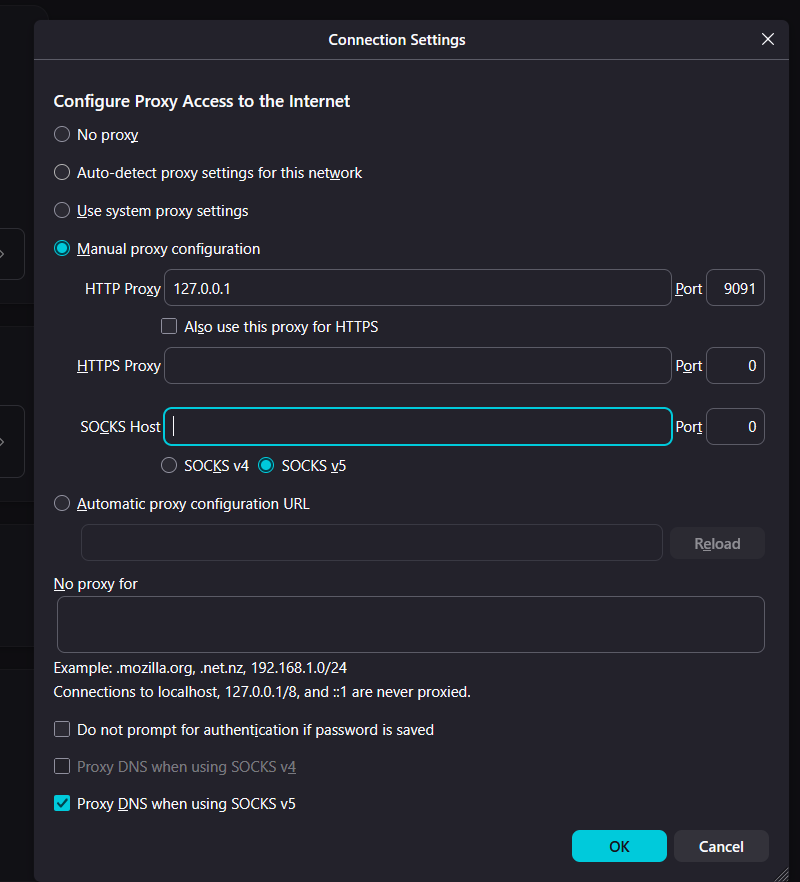
Now, all traffic sent to the local port 9091 will be routed through the remote server. We need to tell Firefox to use this proxy. The proxy menu is under the "Privacy and Security" tab as of this writing. Here is a link.
You'll want to click the "Manual Proxy" option, fill in the HTTP proxy, and port information. Here is an example:
After saving, you can now type in the IP address of the mikrotik into Firefox as if you were on the local network: 192.168.88.1. Firefox + SSH will transparently route your request through the tunnel, making it appear on the remote network. You should have access to the webfig.
SSH + Winbox
This is the way I learned recently to access the routers via Winbox. Since Winbox now runs on Windows, MacOS and Linux, I much prefer it to the web experience.
Instead of a local dynamic proxy, we'll instead forward the Winbox port to the router via the intermediate machine. The syntax looks like this:
# ssh -L [local-address]:[local-port]:[remote-address]:[remote-port] [proxy-user]@[proxy-address]

ssh -L 127.0.0.1:8090:192.168.88.1:8291 tcs@100.2.1.3
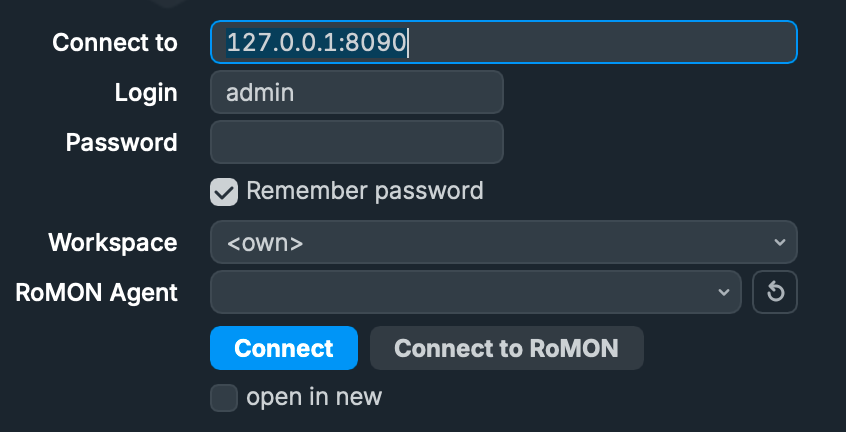
In the above snippet, we are forwarding the local port 8090 (that is, the one on my laptop 127.0.0.1) directly to the Mikrotik router (192.168.88.1) on port 8291. The tcs@100.2.1.3 is the relay through which we are running the connection. Once a connection is established, I can open up Winbox and type 127.0.0.1:9080 in the "connect to" section to connect to the remote Mikrotik router. Like so:
If all is configured properly, huzzah! You have now accessed the router through your proxy successfully. Update your packages, reboot your router, do whatever to your heart's content!